Showing posts with label Smartphones. Show all posts

Saturday, 15 March 2008

Review: HTC Touch Cruise P3650


HTC has had considerable success in Australia with its Touch line of products - the Touch PDA / smartphone and the Touch Dual slider. They're about to introduce a new high-end Touch model - the Touch Cruise - which packs in most of the features that the other two Touch variants lack, whilst still maintaining a traditional 'candybar' PDA form factor with no numeric keypad.


Design


The Touch Cruise looks quite different overall from the other two Touch models; most of the front has a glassy finish to it, with only the directional pad and soft keys finished with a stronger substance. 


In terms of physical features, the Touch Cruise packs more into the whole handset. On the face, you will find the send / end keys, a shortcut for GPS, a shortcut to Internet Explorer (or Opera, which is also included) and a very interesting and highly effective directional pad that as well as serves for left/right/up/down selections, also works as a rotary jog dial for quickly scrolling through menus. In the middle of this circle is a select button framed by a white light.


Above the display, which although only operates at 240x320, looks bright and clear, is a VGA self-portrait camera, and the earpiece with two multi-function notification lights built in.


The left side features a shortcut that could be customised to Windows Live Messenger; it features a graphic similar to an instant messenger speech bubble. Further down you will find a spring-loaded volume rocker.


The right side features a microSD card slot and a camera shortcut. The top of the device features a power button, whilst the bottom features HTC's ExtUSB port (which is compliant with existing mini-USB cables and HTC's own cables), a lanyard slot, and the stylus port - as this is a bottom loader. Personally this is a pet-hate of mine, but I quickly grew used to this.


The back of the device is very similar to the other Touch models in that it is finished in a deep grey soft-touch material; it is emblazoned with 'HTC' and 'Touch Cruise', and of course, features the 3.0 megapixel camera and self-portrait mirror.


Overall the device looks very professional. Although it follows the 'smartphone-standard' grey and silver mix, it wears it very well. The more vibrant silver running along the side profile of the device gives the impression that it is slimmer than it is, and, overall, it bears a nice weight in the hand. The footprint of the device is quite large, to accommodate the 2.8" display, but it is certainly pocket-friendly and is comfortable to use.


Performance


During the time when we were reviewing HTC's last Touch model, the Touch Dual, a claim arose from the HTC fan community that the manufacturer had not included proper, full-speed video drivers with some of the most important (and expensive) HTC models - such as the Kaiser (HTC TyTN II), and indeed, the Polaris (Touch Cruise). I did notice significant lag at some times - especially when switching between applications and changing the HTC Home menu. This was simply unacceptable for a phone that will cost more than $950 when available in stores.


Luckily, HTC has promised a software fix to the driver issue, so it shouldn't be a problem for much longer. Apart from this lag time, actual performance within applications themselves was well above average. The Touch Cruise felt snappy and alert; the camera application was quick to start and media playback was fine. 


We were disappointed, however, with the camera itself. Smartphones often don't carry great cameras and they don't aspire to. The Touch Cruise, however, packs a three megapixel shooter so I was hoping the quality of the shot would be at least acceptable so the bigger prints would come out well. This wasn't the case - the snaps were grainy, overexposed and blurry.


Cold boot-up time was above average, though, and switching on from standby was very quick.


Day-to-day use


HTC's Touch Cruise does well in most everyday situations. Text messaging and emailing on the go, while walking, though, was quite difficult due to the smallish stylus, glossy screen and virtual keyboard. HTC has made some effort to increase mobile texting usability with larger on-screen keyboards, but you really need to stop to bash out a message accurately and quickly.


Despite input problems, the screen itself is beautiful. Although it's only at 240x320 resolution, HTC has repeated its excellent work from the Touch and Touch Dual in creating a really good-looking display. In low or bright light, it maintains a good brightness level and generally, it worked well wherever we were.


Controlling most menus and programs was easy thanks to the jog-dial / D-pad below the display. A blaring omission by HTC in the shortcut key bank below the display (which includes GPS, Internet Explorer and send / end) is a Start menu key; if we needed to access an application in the Start menu, we either had to use a finger, or get out the stylus, which defeats the purpose of one-handed control with the jog wheel.


The Touch Cruise has all the network capabilities you could want at this point in time; it stocks 3G, HSDPA downloads, Bluetooth 2.0, GPS, and WiFi 802.11b/g. Browsing the internet over WiFi was quicker on the bundled Opera browser than on the standard Internet Explorer - it was a good move by HTC to include the option. Bluetooth connection to a computer and to various other phones was reliable and data transfers were fast to complete.


Our prerelease review model didn't come bundled with any GPS navigation software, but expect the retail version to include a free CoPilot Live license. With Google Maps, however, the GPS was fairly accurate but it was slow to lock on to our position; sometimes taking up to five minutes.


Mobile internet is still a bit slow; broadband speeds are still not very realistic. Email on the go was fairly easy to setup, but it doesn't match BlackBerry ease of use.


Conclusion


The HTC Touch Cruise offers all the features and connectivity you could want in a stylish, slim form factor - except a physical keyboard. Not everyone wants a slide-out keyboard, though - so if you can deal with having to stop and text, then the Touch Cruise could be the work- and play-orientated smartphone for you. Until HTC figures out its video drivers issues, though, it's not for us.

Tuesday, 11 March 2008

BlackBerry reviews are coming!


At TB Tech we try to report on and review products that appeal directly to Australians; one big success down under has been the BlackBerry from RIM; both corporate-owned models and consumer variants have appealed widely to business types here.


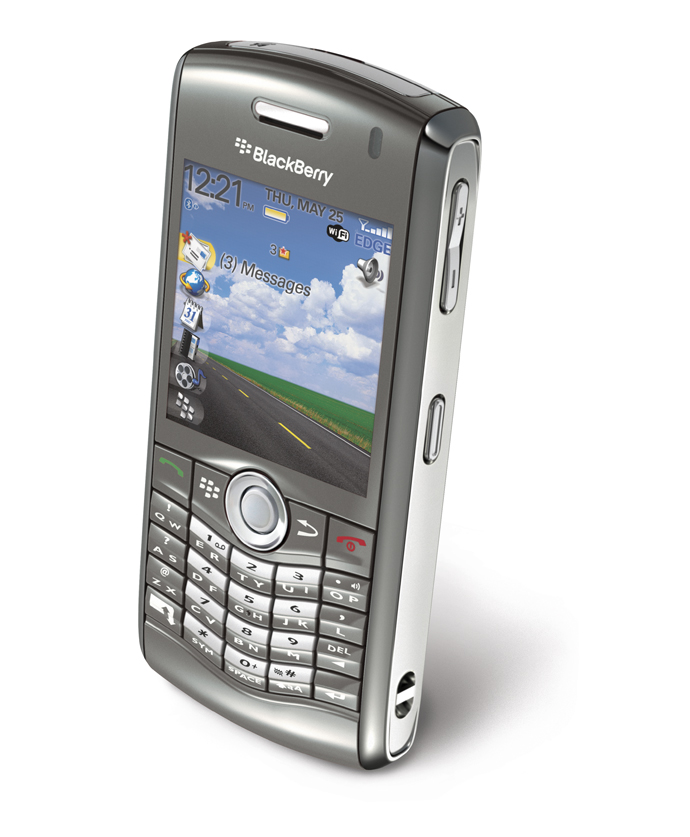
We will be conducting our first ever one-week BlackBerry review from tomorrow until next Wednesday, with the Pearl 8120 model. This is a consumer-focussed model with a SureType half-QWERTY keyboard, camera and extra multimedia capability. It does include the standard BlackBerry Connect advantages in push email and server integration.

We are currently upgrading our Flickr account so you can expect the far overdue pictures of the HTC Touch Cruise (review coming), Nokia 5610 XpressMusic and the BlackBerry Pearl 8120 later this week.

RIM patent would lock down BlackBerry cameras by key


RIM's runaway success with its BlackBerry platform has seen the need for two distinct types of BlackBerry smartphone - the camera variants, and the non-camera models.


Corporate espionage scandals have seen the need for this action, but a new patent proposal by Research in Motion would suggest that one way to include the camera, but control in-office use, would be by using a removable key.

Whilst the key is inserted, the camera works just fine; however, pull it out and you'll get blank snaps.

It seems a little bizarre to return to such an old-fashion control method; keys can easily be duplicated. A more reliable and easy-to-integrate technology would be some sort of wireless/work networking camera switching - as soon as the phone enters the office, the camera is unusable.

Speaking of BlackBerry - our first ever BlackBerry review starts tomorrow with the Pearl 8120.

Sunday, 17 February 2008

Nokia prepping updated QWERTY E-Series smartphone?


CNET Australia's Joseph Hanlon has made an interesting discovery at Showcase Nokia 2008 in Sydney - a secret 'side-by-side photo' of the E61i (Nokia's current QWERTY candybar smartphone) and its successor, the E71.

There have been a few rumours floating around about the E71 and the picture that CNET is advertising looks very much like the last mockup we saw a few months ago. However, we've actually got some specs to speak of. We could be seeing:

  • HSDPA 3.6Mbps
  • WiFi (most likely 802.11b/g)
  • Bluetooth
  • microSD support
  • 3.2 megapixel camera (up from the E61i's 2 megapixel)
  • Full QWERTY keyboard
  • GPS
The E71 also looks to be far more compact than its older sibling, being only 57mm wide and only 10mm thick - something we'd like to see to believe.

If CNET is right, we should be seeing this sometime in late Q2 2008.

[via CNET Australia]

Monday, 4 February 2008

Exclusive: HTC launching Telstra Next-G Touch Dual 850

After just completing a review of HTC's P5500 Touch Dual handset, I was a little surprised to see a press release documenting HTC and Telstra's new Touch Dual 850, exclusively for Australia.

The new Dual handset differs from the standard, unlocked model in a number of ways: firstly, it is customised for Australia (and the world's) fastest data network; it offers built in Sensis Search, Whereis Maps (although probably not GPS) and Foxtel Mobile; and finally, and most importantly the Touch Dual 850 features the half-QWERTY keyboard that Australia has so far missed out on.

Telstra's Next-G 3.5G network seems perfect for the Touch Dual; high-speed mobile connectivity covering over 95% of the Australian population is a tempting prospect, which almost makes up for the alarming lack of WiFi that we saw on the Touch Dual P5500. However, the new model is priced relatively highly: outright, it's A$929, just over the price of the generic version, but it will also be available on a Telstra post-paid $80 per-month plan.

We will be taking an in-depth look at the Telstra HTC Touch Dual 850 at the beginning of March, so stay tuned.

Friday, 25 January 2008

Review: HTC Touch Dual P5500

Pros:

  • Professional and stylish
  • runs Windows Mobile 6 Professional
  • Excellent slide-out numeric keypad
  • Easy to use
  • Standout call quality
Cons:
  • Using the stylus can feel strange
  • Difficult to type without the keypad
  • No mini-USB connectivity
  • Not a full QWERTY keyboard

HTC has come a long way since its extended operation as an original equipment designer over the past few years. Since buying out Dopod, and severing ties with O2 Asia, i-mate and other manufacturers who previously sourced devices from HTC, the company has succeeded in creating a somewhat-known brand that takes and increases on the quality of the devices that it made for other brands.

The original HTC Touch P3450 debuted in June last year, and although it offered users a dramatically simplified Windows Mobile experience called TouchFLO(if they wanted), it was seen to be less than it could be, as it did not have any form of text input other than on the virtual keyboard.

However, in October 2007, HTC announced another product for their now expanding Touch line - the HTC Touch Dual P5500. This took the excellent features of the existing Touch and built upon them, namely with the slider form factor featuring either a numeric pad (T9) or a dual-key QWERTY keyboard under the slider, depending on region.

Here in Australia, we get the 16-key T9 numeric keypad, with built-in Start, Messaging, Back and Internet shortcuts. Inputting text and numbers on the Touch Dual still isn't as good as on a smartphone with a full slide-out QWERTY keypad (as featured on other HTC devices such as the S730 and the TyTN II), but it is dramatically easier than on the original Touch model.

Design

The Touch Dual, when closed, features a design quite similar to the original Touch. The Touch Dual is only available in dark grey with silver accents, for now.

On the front of the device, we see the reasonably-sized 2.6" TFT display at 240x320 resolution. When turned on this looks clear and bright. Below the screen, there are send and end keys, and a five-way directional pad. Unfortunately, and annoyingly, there are no soft keys for selecting the two options on the bottom of the screen, unlike many other Windows Mobile 5 and 6 devices.

Above the screen is the speaker, and a VGA front-facing camera, which is an addition over the Touch. The Touch Dual is a little taller than the Touch, and feels a bit more spacious.

On the top there is a power button; on the left hand side, a microSD card slot and the HTC ExtUSB proprietary port, for sync + charge + headphones; on the right, we have a camera shortcut and the stylus at the top. The bottom is devoid of any features.

On the back, there is a two megapixel camera, without a flash but with a self-portrait mirror.

Around the sides of the device, there is a silver chrome strip - this is a classy feature which adds to the grey/silver theme, but also makes the device seem a little slimmer.

Performance

The Touch Dual runs Windows Mobile 6 Professional, with a few specialised HTC plug-ins that really assist the user in getting around what can be quite a complicated operating system faster, and with ease.

On the home screen, which is, by default, grey to suit the device, you see HTC Home, an add-on which allows quick access to the time, weather, ring/vibrate settings and the phone features of the device. This is a very nice feature, but I found it to be a little slow and for some of the buttons to take a second press. It didn't like my fingertips too much, either, which was a real niggle as the stylus was sometimes difficult to get out, and was also too small.

Otherwise, Windows Mobile 6 was fast enough on this device, but general speed and performance could have been better. Although the Touch Dual features a 400 MHz Qualcomm chipset, the operating system was sometimes slow, and it wasn't as snappy as I would have liked.

Some features, however, were pleasing. The camera was very quick to start, and pictures were easy to take and processing didn't take long. Picture quality was also fine, but nothing special.

Day-to-day use

The Touch Dual is very easy to live with. Its rubberised finish makes it easy to hold in the hand, and reduces slip when in fast-moving conditions. Access to key features when time mattered was generally fine, and the device consistently performed above average in all areas.

Call quality was a standout - the Touch Dual maintained a strong signal at almost all times on Vodafone Australia's 3G network around Sydney, and callers were able to hear us fine on the Touch Dual, just as we found the party on the line to be strong and clear.

Bashing out text messages varied in speed depending on the input method - I found it best to type on the T9 keypad with predictive text turned off. The on-screen virtual touch keyboard and keypad were helpful sometimes, but they ended up being slow and irritating.

Interestingly, the screen is flush with the surface of the phone. This is something relatively rare in a stylus-based PDA, and I found it to be an annoyance. It certainly looked better than a screen that sits lower than the surface, but the stylus sometimes 'didn't like' the glossy display and I felt like pressing too hard might break it. Finger tapping was far more satisfying than using the stylus, and that became my preferred way of using the device.

I didn't choose to use HTC's TouchFLO interface much. TouchFLO lets you use Windows Mobile 6 in a very iPhone-like way - scrolling around HTC-designed menus with finger flicks. I found it was much faster to access the features normally through the standard software.

Unfortunately I didn't get a chance to test out data use on the Touch Dual, but I'm sure it would perform very well on any HSDPA network.

Finally, the device synced well and charged quickly. After just ten minutes charging, I saw the battery increase 5 percent, which I considered to be quite outstanding.

Conclusion

The HTC Touch Dual is a very enjoyable smartphone. It maintains a reasonable balance between form and function, with good looks combined with easy-to-use features and a good keypad. I found the Dual a huge improvement over the original Touch, and that's a good thing. HTC has taken a big step in the right direction with the Touch Dual, and I would easily recommend it to anyone seeking a smartphone with looks and brains.

Wednesday, 23 January 2008

A little bit of Snow for HTC's Touch & Verizon


Engadget Mobile has had an anonymous tip overnight here in Australia with outstandingly clear, almost press-quality images of HTC's new Snow White coloured Touch, specifically for Verizon Wireless in the USA, confirming its existence.

The new white model will become the Verizon XV6900 Touch, a CDMA version of HTC's popular consumer-orientated PDA.

Known specs are:

  • Special snow white colour
  • Windows Mobile 6 Professional
  • HTC Home customisation
  • GPS
  • EV-DO data via the CDMA network
  • 2 megapixel camera
If Telstra was still doing its CDMA thing after the end of January this year, then we might have seen this with a carrier here - we sure would have liked to see the snow white colour in Australia, but this looks like another U.S. special.

Read: Engadget Mobile's post/gallery

Monday, 21 January 2008

A return to the 'old' PDA: HP's iPAQ 112

The HP iPAQ 112 Classic Handheld is a funny one. Whereas smartphone and PDA manufacturers such as HTC, Asus, Palm and even HP itself are leaning towards developing devices with full QWERTY keyboards, 3G phones and thin profiles all included, the iPAQ 112 goes against most of the now common PDA rules.

It's a return to the 'old' style of PDA, like the PalmPilots of the 1990s, and early HP iPAQs of the past few years. It features a big, beautiful oversize 3.5" screen, but no keyboard. It runs Windows Mobile 6... but it's the Classic edition, so there's no phone. It's quite thin, though.

What's my point: We're receiving one on Wednesday, for our review of a return to the 'old' PDA style in HP's latest budget model.

Stay tuned!

Monday, 7 January 2008

Could this be the Palm Drucker, aka new Treo 750?


Bill Gates just now delivered his 12th and final keynote at the Consumer Electronics Show - and a device, looking very much like a bulked-up Palm Treo 500 or perhaps a Centro, was flashed behind him with an array of other Windows Mobile devices.

This could certainly be the 'Drucker' we heard all about yesterday - see Smartmobile's post.

Stay tuned for more information when it comes.

[via Engadget]

Vodafone's 2008 lineup revealed, detailed


Our mobile handset blog, TB Tech Smartmobile, has the goods on Vodafone UK's entire 2008 smartphone lineup - new handsets from Nokia, BlackBerry, Palm, and HP.

Head on over to Smartmobile.

Thursday, 3 January 2008

Asus M530W smartphone gets fiery


Not too often that business-focussed smartphones deviate away from the industry-standard black and grey colour schemes, but Asus has announced it will start producing its M530W Communicator smartphone in a white/orange colour combination as well as its standard grey model.

Specs include:

Full QWERTY keyboard
3G
390MHz ARM 11 CPU
Windows Mobile 6 Standard (non-touchscreen)
2.4" QVGA display
2 megapixel camera
mini-USB / Bluetooth
Push e-mail support
microSD card slot (up to 2GB)

Hopefully we'll get our hands on one of these colourful beauties soon.

[via UnwiredView]

Links: UnwiredView's info page
Sogi, original source + pictures (untranslated)